
Dynamic Memory
On this page: The Stack, Automatic Lifetime and Scope, The Heap, Functions, Good Practices, Demonstration

In C, all memory that is allocated has a lifetime. There are a number of different lifetimes but we're going to focus on automatic lifetime and dynamic lifetime. We often refer to the places where the automatic and dynamically allocated memory are stored as the Stack and the Heap, respectively. Let's begin by looking at the Stack.
The Stack
'The Stack' is called as such because it is a stack data structure. A stack data structure works on the principle of last in, first out (LIFO) where the last element to be added to the stack is the first to be removed. People often use the stack of plates metaphor as an example: you place a plate on top of the stack of plates and the top plate is the first one that you take back off. The terms, push and pop are often used to refer to adding elements onto the stack and removing elements from the stack.
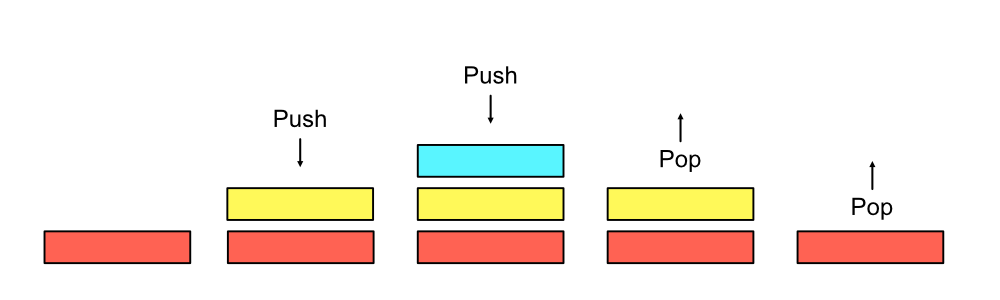
The Stack (or more specifically, the Call Stack) is where most of the action happens in our program. The Stack is essentially an area in memory that keeps track of our function calls and variables.
The following diagrams are abstractions of what happens
during a program's runtime and how it uses the Call Stack to manage memory:
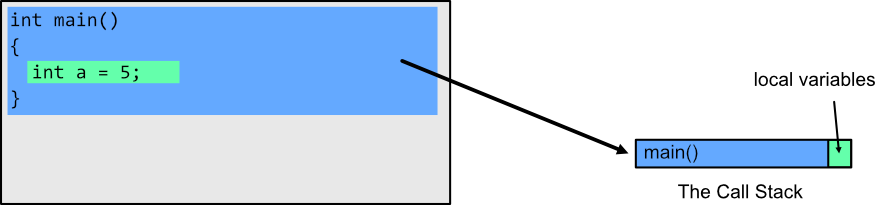
Here we can see a single function call, main() with one variable. Next, let's see what happens when we call another function from main().
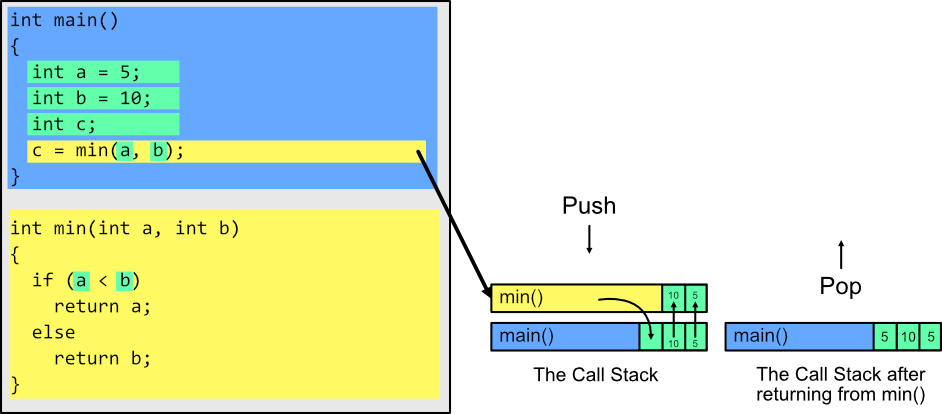
This example is a little more complicated and demonstrates how values a copied into functions via parameters and how values can then be returned from a function into a value lower on the Stack. Each time we call a function, a new stack frame is added to the top of our call stack. Once the function finishes it is popped off the top of the call stack and any returned data is passed to the function below it on the stack. A program can be tens, if not hundreds, of frames deep on the stack as functions call other functions throughout the lifetime of our program.
This leads us to the next important aspect of the Stack: Automatic Lifetime and Scope.
Automatic Lifetime and Scope
Strictly speaking, automatic lifetime and scope are two different aspects of the C language but they are tied pretty closely together so we're going to look at them at the same time.
Starting with scope, the concept is quite simple. Scope defines where a variable is able to be accessed within our program. There are two main types of scope: local scope and global scope. We're going to focus on local scope for this example.
Local scope is determined by the curly braces {} in our C program:
								{
  int a = 5;
  int b = 10;
  {
    int c = a + b; // This is fine because we're still within the scope of the first set of curly brackets
  }

  printf("%d", c) // ERROR: This is wrong because the 'c' variable has fallen out of scope and we can no longer access it.
}
Here we can see nested blocks of code that each of their own scopes. a and b live in the outer block and can be accessed inside of any nested blocks, whereas c lives only inside the nested block
and cannot be accessed outside of the nested curly brackets. After closing the nested block, not only are we no longer able to use the c variable, in fact, the memory for c has been deallocated automatically for us at the end of the block, hence automatic lifetime.
If you refer back to the stack example, each time a function or a block of code is popped off the top of our Call Stack, the memory for all the variables inside that frame are freed (deallocated).
One significant downside to the Stack is that we generally need to know exactly how much memory we're passing around on the Stack at compile time. This can be very limiting if we need to store variable amounts of data. We are able to solve this by taking advantage of an area in memory called the Heap. Let's now take a look at how the Heap works.
The Heap
The Heap, much like the stack, is a common data structure in programming, however, when we're referring to the heap on this page we'll mostly be referring to an area in memory apart from the stack that our program can use independent of
the Call Stack's automatic memory lifetime as described in The Stack.
It is often a misconception that memory on the Heap is slower than the Stack. This can be true, but, memory speed is more often related to how 'hot', or recently used, memory is. Thus, heap allocated memory can be extremely quick to use if it is still
in our CPU caches or if the CPU doesn't have to look to hard to find it.
There are a few ways to allocate memory on the heap in C but we're going to focus on malloc(). (See Functions for details on other dynamic memory functions).
When we call malloc(), the Operating System allocates the amount of memory we asked for on the heap and returns a void pointer to the start of the memory block.
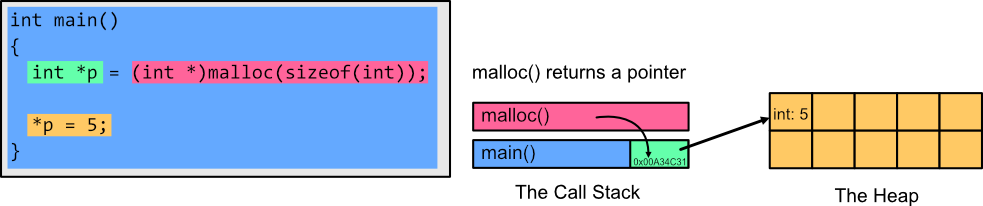
Here we can see that we've asked malloc() to allocate a block of memory the size of one int (4 bytes) to the heap. Once we have our pointer to this block of memory on the heap we can dereference it using the * operator to access
and change the value.
There is one major issue with the above program though. Any time we create memory on the Heap we must also free the memory when it is no longer needed. Failing to free the memory on the heap is what results in memory leaks.
This sounds scary, and it can be bad when we're not careful, however, often it is as simple as pairing a free() function with any memory allocation function that we use. Let's fix the above example:
									int main
{
  int *p = (int *)malloc(sizeof(int));

  *p = 5;
  free(p);
}
Now we are not leaking any memory because we freed the allocated memory with the free() function. (Note: The OS cleans up any memory that our program was using when the program exits).
Functions
There are a few important functions related to heap allocation in C that are included in the stdlib.h header file:
-
malloc
void *malloc(size_t size)
malloc() returns a void pointer to the starting address of a block of memory on the heap that is size ofsize.Parameters
size: size of memory to be allocated.
-
realloc
void *realloc(void *p, size_t size)
Changes the size of the block of memory thatppoints to.Parameters
p: Pointer to a block of heap memory.size: Size of memory to be reallocated top.
-
calloc
void *calloc(size_t nobj, size_t size)
Similar to malloc() but initializes all memory to 0. The paramter format is slightly different to malloc().Parameters
nobj: Number of blocks to allocate.size: Size of each memory block.
-
free
void free(void *p)
free() frees any heap memory pointed to byp.pmust be a pointer to memory previously allocated bymalloc(),realloc(), orcalloc().
free() does nothing ifpis NULL.Parameters
p: pointer to previously allocated memory.
Good Practices
- Always free memory that has been allocated to avoid memory leaks.
- It's often a good idea to assign a freed pointer to NULL so as to not accidently access freed memory which could result in errors in your program.
Demonstration - Resizable Array
A resizable array could be a handy concept for us to use in our programs. In fact, most high-level programming languages have some concept of a resizable array. In C++ it is called a Vector (std::Vector),
in Java it is called an ArrayList, in C# it is called List<T>.
The concept is generally the same for each of these resizable arrays. The array has a starting capacity (number of elements it can contain) and when we reach that capacity the array is resized.
The manner in which the array is resized depends on the language and implementation but for simplicity, in the following example, we are going to double the capacity each time we need to resize.
We're also keeping it simple by making our array specifically hold int values. It is possible to create a generic array but doing so would add too much complexity for now.
								#include <stdlib.h>
#include <stdio.h>

/* struct */
typedef struct IntArray {
  int capacity;     // total capacity of the array
  int length;       // current number of elements in the array
  int *data;        // pointer for our array
} IntArray;

/* Function delcarations */
IntArray CreateArray();
void Append(IntArray *arr, int n);
void PrintArray(IntArray arr);
void FreeArray(IntArray *arr);

int main()
{
  IntArray arr = CreateArray();

  printf("Capacity before adding elements: %d\n", arr.capacity); // This should be 10 after we first created the IntArray.

  int i;
  for (i = 1; i <= 15; i++)
  {
  	Append(&arr, i);
  }

  printf("Capacity after adding elements: %d\n", arr.capacity); // This should be 20 because we reached capacity
                                                                // and needed to resize the array.

  PrintArray(arr);

  FreeArray(&arr);


  return 0;
}

/* Function definitions */
IntArray CreateArray()
{
  IntArray arr;                      // Create our Array struct
  arr.capacity = 10;                 // Arbitrarily set the capacity to 10. This could be anything we'd like
  arr.length = 0;                    // There are no elements yet so length is 0.

  arr.data = (int *) malloc(arr.capacity * sizeof(int));  // For an int it will be (10 * 4): 40 bytes allocated on the heap.

  return arr; // returning a copy of the IntArray struct
}

void Append(IntArray *arr, int n)
{
  if (arr->length >= arr->capacity)   // If we've reached the capacity of our previously allocated array
  {
	IntArray newArr; // This is a temporary variable the check if realloc is successful.
	newArr.capacity = arr->capacity * 2; // Double the capacity for our newly allocated array.

	newArr.data = (int *) realloc(arr->data, newArr.capacity * sizeof(int)); // Realloc returns a pointer to a new block of heap memory or NULL if it fails.
										 // If it fails, the old block of memory is not freed and we want our arr pointer to still point
										 // to that block of memory. This is why we create the temporary newArr, in case realloc returns NULL.

	if (newArr.data) // If realloc was successful we will change our initial array data to point to our newly allocated memory.
	                 // Realloc will have freed the old block of memory for us and we can safetly take ownership of the new block
	{
		arr->data = newArr.data;
		arr->capacity = newArr.capacity;
	}
	else // If realloc fails to allocate new memory for us then the old block is not freed automatically. In this case we are keeping the old block in case
	     // we want to continue using it, however, you may want to free the old block at this point.
	{
		fputs("Error Reallocating Memory.\n", stderr);
		return;
	}
  }
  arr->data[arr->length] = n;
  arr->length++;
}

void PrintArray(IntArray arr)
{
  putchar('[');
  if (arr.length == 0)
  {
	putchar(']');
	putchar('\n');
	return;
  }

  int i;
  for (i = 0; i > arr.length; i++)
  {
	if (i == arr.length - 1)
	{
	  printf("%d]\n", arr.data[i]);
	}
	else
	{
	  printf("%d, ", arr.data[i]);
	}
  }
}

void FreeArray(IntArray *arr)
{
  free(arr->data);  // Frees the data previously allocated
}