
Intro to Memory
C is a language that interacts directly with memory so understanding how memory works is crucial to effectively learn C. Firstly, lets quickly define a few concepts that are going to come up frequently:
Allocation
Allocation is the word we often use to when we ask C (or rather, when C asks the operating System) to reserve memory for us. This happens every time we create a variable and a different amount of memory is allocated depending on what data type we're using. We'll see an example of what this looks like in a moment.
Stack vs. Heap
This is something that's going to be much more important to understand when we start looking at dynamic memory management. In short, There are two main places that C (and pretty much every other programming language) keeps track of memory, the stack and the heap. Through weeks 1 to 5 we have only been using the stack. Each time we create a variable C allocates memory on the stack for us and when the variable falls out of scope C frees (deallocates) the memory on the stack for us. The one big caveat with stack memory is that we need to know exactly how much of it we need at compile time. That's where the heap, dynamic memory and runtime memory allocation come in. See Dynamic Memory
									{
  char c; // 1 Byte (8 bits) of memory is allocated onto the stack
  int i; // 4 Bytes (16 bits) of memory is alloacted onto the stack (Sometimes int is 8 Bytes, 32 bits)
}
// After the closing brace, C frees the memory of these variables.
// Conveniently, C also makes these variables fall out of scope so we don't use them and access bad memory.
Let's see how this looks in practice. I think it's worth looking at what is actually happening to our memory to better understand what's actually happening.
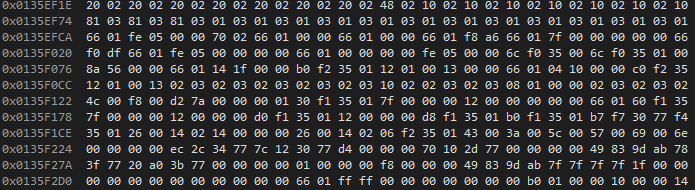
This is what the registers in the memory addresses look like. In this case we can see groups of two hexadecimal numbers, each representing 1 byte of memory. Conveniently, the binary values in 8 bits fit into two hex values: 0000 0000 - 1111 1111 == 00 - FF == 0 - 255
Suppose the following declaration of our variable i that is a int type:
int i;
These are the 4 bytes that has been allocated to use the variable i. You can see that they are all just random values for now. The bytes that aren't underlined are positions in memory that can be used by other variables in our program, though, they are not related to our int variable.

Let's try assigning a value to i.
i = 5;

The first byte changed to the number 5 and we can see by the red text that C also set the remaining bytes to 0.
This discussion on memory continues in Arrays.