
Streams and Buffers
On this page: How Do We Fix It?, A Brief Word on gets()

Streams are essentially sequences of data and are often equated with entities that control a programs input and ouput. In C we come across streams in a few forms but they all effectively function in the same way.
The streams we're most familiar with are stdin (standard input) and stdout (standard output). These are the streams we interact with when using scanf() and printf(). A similar stream that we can access is called stderr (standard error) which is the default stream for error messages, however, these tend to be routed to the same location as stdout.
Buffers are often closely linked with the functionality of a stream and sometimes it can be hard to precisely draw the line between one and the other at a first glance. A buffer is essentially a block of memory that holds data coming in from the stream for our program to read. In order to best understand let's look at a simple example with some diagrams.
									#include <stdio.h>

int main() {
  char c;
  scanf("%c", &c); // User types 'abcdefghij' then hits enter.

  return 0;
}
Above is a simple program where we use scanf() to read a single character from the stream. In this example the user provides more input than we need. We've only asked for a single character but the user has entered 10 characters to better illustrate how the interaction between a stream, buffer and program.
- Firstly, out program reaches the
scanf()line and waits until it can read data from the buffer. - At this point we can type in data into the console. Because of the way most consoles work, the data is not sent until we press the enter key.
- When we hit enter, the data from the console is moved into the
stdinbuffer. scanf()reads the data the it needs from the buffer. In this casescanf()is looking for the first non-whitespace character, which in our example is the character 'a'.
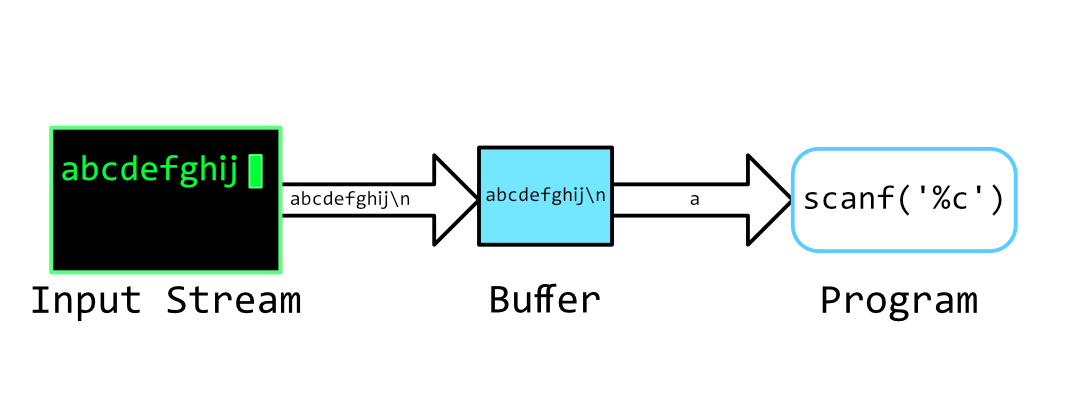
- Now we can observe one of the tricks of an input buffer.
scanf()consumed a character like we asked it to but has left the remaining data from the stream in the buffer.
In the diagram below we can see that the remaining input, 'bcdefghij\n', is still in the buffer and it will stay there until we do something with it.
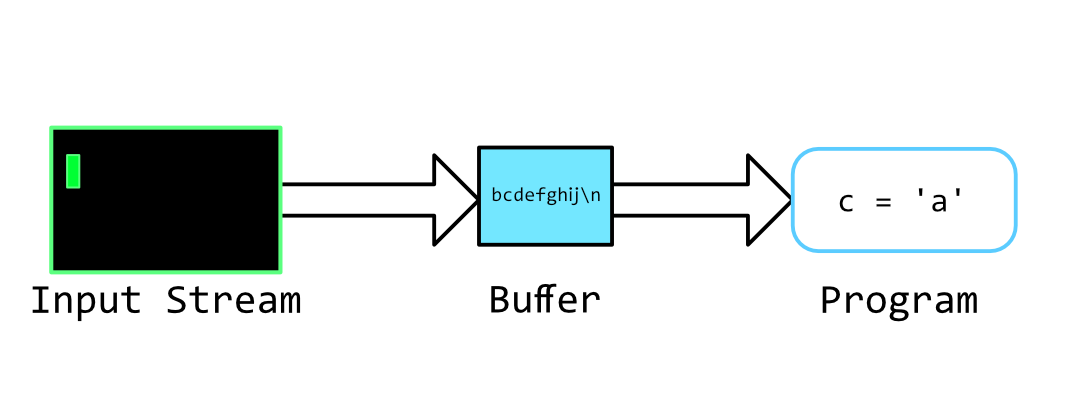
Let's say we change our program slightly:
								int main() {
  char c, d;
  scanf("%c", &c); // User types 'abcdefghij' then hits enter.

  scanf("%c", &d); // Now we would like to get some new input for our variable 'd'.

  return 0;
}
The first 5 steps happen as above, then we call scanf() again.
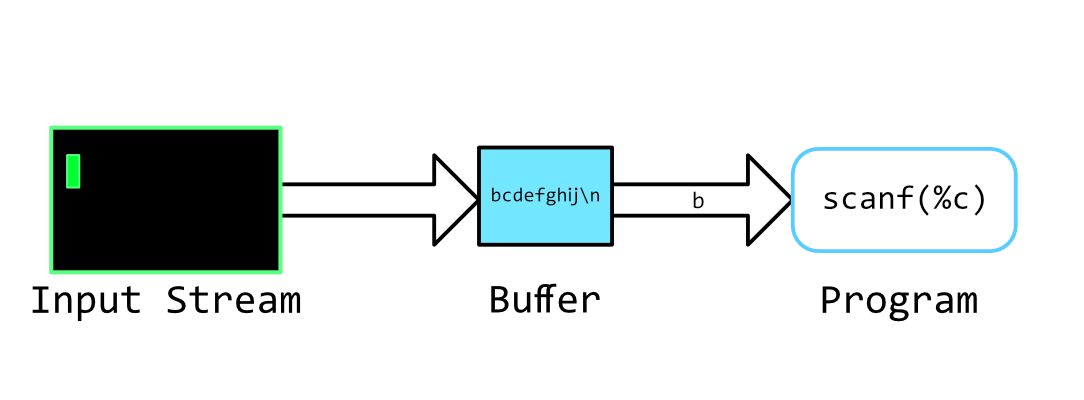
scanf() consumes the next character in the buffer without allowing us to input new data. We're still dealing with the data from the first input that wasn't used.
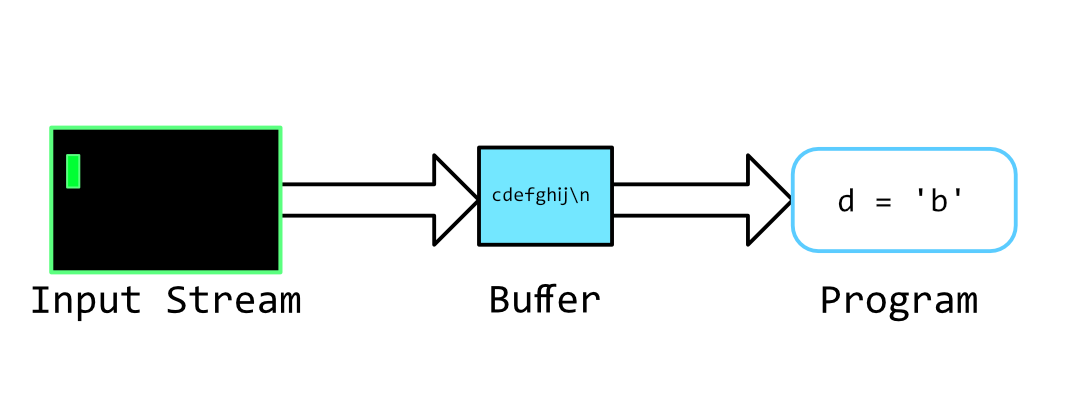
It is this problem that can make scanf() (and similar functions) tricky to work with when we're not 100% sure of what the input is going to be. If the user inputs only one character in the first step there wouldn't be any problems, however, we often cannot assume that a user or a file is going to provide the exact data that we're expecting.
How Do We Fix It?
Short answer, we need to clear the buffer before we ask for new input. Long answer, it's actually not that difficult. There are a few ways to go about it but let's take a look at two possibilities.
getc() and getchar()
getc() is a handy function which consumes then returns the next character in the buffer. Likewise, getchar() works exactly the same but only interacts with the stdin stream. Let's pick up from where our program was last. The characters 'cdefghij\n' are still in the buffer and we need to clear it before we can get new data.
								  scanf("%c", &d);
  // At this point 'cdefghij\n' is still in the input buffer.

  while (c = getchar() != '\n');
  // Now our input buffer is empty

  return 0;
}
Here we are using getchar() to consume each character one at a time from the buffer.
At each iteration of the loop we are comparing the result of getchar() (which is the consumed character)
until we find the line-feed \n. We know that the \n is going to be the last character
because it is automatically added to our input when we press enter. Once getchar() has consumed all
the values, the buffer will be empty and we can once again ask for new input.
This may seem inefficient but this is a fairly typical way of flushing a buffer in C.
getchar() and getc() are often implemented as macros in the stdio.h which means they do
not incur the overhead cost of a function call. This makes them very fast to execute.
fgets()
An alternative method is to read the entire input and handle it all at once.
Doing this means that the input buffer is cleared immediately and is able to take the next stream of data.
There are two main ways of doing this: the fgets() function, and it's ugly step-sister, gets().
(It's also possible to implement you're own version of gets() and fgets() using getc()/getchar()).
We can use fgets() like so:
								char string[1000]; // Create a character array which is large enough to store the desired input;
fgets(string, 999, stdin); // param: (char array, read limit, FILE stream)
Once we have the input stored in the string we can use a special version of scanf() called sscanf() which works very similarly to scanf() except it takes input from a string rather than the stdin.
								char string[1000];
fgets(string, 999, stdin);

char c;
sscanf(string, "%c", c);
The benefit of this is that our input buffer is likely to be clear thanks to fgets() (though it's still not guranteed. See below for more info) and we can now do whatever we like with the string variable without it messing up read functions later in our program, like we saw earlier.
A Brief Word on gets(), And Why Not To Use It
The gets() function has proved very problematic for the C language in the past due to the way that it reads input. gets() will continue reading until it finds a \n character. This more or less is what we implemented above with the getchar() function, and in that circumstance it would work fine. However, if you were to use gets() to read a string into a char array, there is no guarantee that the string will contain the \n before the char array is filled (there's no guarantee that there will be a \n character at all!). This can result in a buffer overflow and can be hugely damaging to your program's operation and security. In more recent version of the C standard, the gets() function has been deprecated in favour of fgets(). The difference being that you can specify a maximum read length, meaning that is it much easier to control how much data is being stored in our char array, and stop any possible overflow.
You may be wondering, 'If we can stop reading the buffer after a set length, and possibly before we've come across a \n character, aren't we still in the position where the the may be data left in the buffer?' The answer is yes. In which case we could pull from the buffer again using fgets(), or we could use the getc() method from earlier to clear the buffer.
You may have noticed that scanf() doesn't sound that much different to gets() in that there is no guarantee of safe input when using the function. This is a fact of functions that rely on stdin, because it is very easy to take unreliable data from the stream. Programmers are often cautioned from relying on scanf() too much, where an alternative solution may be to use fgets() combined with sscanf() for simpler error checking and recovery. For more info check out this Q&A: Why not scanf()? What else?